
MaGek
-
Număr conținut
3247 -
Înregistrat
-
Ultima Vizită
-
Zile Câștigate
35 -
Country
Egipt -
Points
47,015 [ Donate ]
Tip conținut
Profiluri
Forumuri
Calendar
Orice postat de MaGek
-
> LINUX_TERMINAL_ENHANCER_v1.0 STATUS: [ROOT_ACCESS_LEVEL_GRANTED] Salut! To be a true Linux power-user, you must master the Terminal. Today, we will optimize your shell environment for maximum speed, efficiency, and that professional "Hacker" look. [01] Speed Up Sudo Execution Reduce the delay when running commands with sudo privileges: # Run this to edit the configuration: sudo visudo Defaults timestamp_timeout=30 # Keeps sudo active for 30 mins to avoid re-typing password! [02] Bash History Optimization Store more commands and prevent duplicates in your history log: # Add these to your ~/.bashrc file: export HISTSIZE=10000 export HISTCONTROL=ignoredups shopt -s histappend [03] System Info Tool (Fastfetch) Show off your system specs like a pro every time you open the terminal: // Execution: sudo apt install fastfetch echo "fastfetch" >> ~/.bashrc [LINUX_MASTERY_RESOURCES] - Official Linux Kernel Documentation - Oh My Zsh Framework - Docker & Virtualization on Linux
-
> SYSTEM_KERNEL_OPTIMIZER_V1.0 STATUS: [ENCRYPTED_ACCESS_GRANTED] Salut! Today we are diving deep into the Windows Kernel. To achieve the lowest possible system latency, we need to bypass standard process limitations and force the CPU to prioritize core system tasks. [01] Kernel Responsibility Tweaks Force the Windows Kernel to remain in RAM for faster execution: # Registry Path: HKEY_LOCAL_MACHINE\SYSTEM\CurrentControlSet\Control\Session Manager\Memory Management DisablePagingExecutive -> Value: 1 [02] CPU Priority Overdrive Adjusting Win32 Priority Separation for better background process management: # Registry Path: HKEY_LOCAL_MACHINE\System\CurrentControlSet\Control\PriorityControl Win32PrioritySeparation -> Value: 26 (Hex) [03] IRQ Priority (Hardware Latency) Prioritize your GPU and Network Card at the Kernel level: // Command Line Execution (Admin): bcdedit /set disabledynamictick yes bcdedit /set useplatformtick yes [RESOURCES_AND_DOCUMENTATION] - Microsoft Kernel Architecture - Open Source Kernel Scripts - Win32 Scheduling Documentation
-
ULTIMATE MEMORY OPTIMIZATION [SYSTEM_RAM_CLEANER_v3.1] Salut! Are you experiencing sudden stutters or lag while gaming or coding? Windows often fails to efficiently clear the "Standby List" in your RAM. Today, we will optimize Memory Management to achieve maximum system responsiveness. 1. Disable Large System Cache (Registry) This setting prevents Windows from allocating excessive RAM for unnecessary system cache, leaving more room for heavy applications and games: Location: HKEY_LOCAL_MACHINE\SYSTEM\CurrentControlSet\Control\Session Manager\Memory Management LargeSystemCache -> Value 0 IoPageLockLimit -> Value 983040 (Decimal) 2. Disable Paging Executive (Kernel Performance) This tweak forces Windows to keep core system files (Kernel) inside the RAM instead of moving them to the Hard Drive, doubling the response time: HKEY_LOCAL_MACHINE\SYSTEM\CurrentControlSet\Control\Session Manager\Memory Management DisablePagingExecutive -> Value 1 3. Force Memory Clear (PowerShell Script) To purge the Standby Memory instantly without third-party software, run this command in PowerShell (Admin): Clear-Variable -Name * -ErrorAction SilentlyContinue; [System.GC]::Collect(); Sources & Verification: - Microsoft Docs: Memory Management - GitHub: Optimization Scripts Collection - TechNet: Registry Tuning Guide
-
Make Your Windows Look Amazing Upgrade your Productivity with a Clean Minimalist Setup ━━━━━━━━━━━━━━━━━━━━━━━━━━━━━━ Step 1: The Magic Taskbar (TranslucentTB) First, let's make that boring taskbar completely transparent: Download TranslucentTB from the Microsoft Store (It's Free!). Set the "Regular" style to Clear. Now your wallpaper will fill the entire screen! Step 2: Center Your Icons A centered taskbar looks much more professional: Right-click the Taskbar -> Taskbar Settings. Change Taskbar Alignment to "Center" (For Windows 10 users, you can use TaskbarX). Step 3: High-Quality Wallpapers Forget low-res images. Use these sites for the best Aesthetic wallpapers: Wallhaven.cc (Search for: Minimalist / 4K). Unsplash (Search for: Workspace / Tech). ━━━━━━━━━━━━━━━━━━━━━━━━━━━━━━ MaGek's Tip for You "A clean desk leads to a clean mind. Try hiding your desktop icons (Right-click -> View -> Uncheck Show desktop icons) for the ultimate clean look!" Sources & Inspiration: Microsoft Store: Official Apps Customization Community: Rainmeter Subreddit
-
- 4
-

-
-
- windows
- operating system
- (și 1 alta)
-
Voted
-

[FreeBSD] FreeBSD: The Powerful Hidden Beast You Didn't Know! 🚀
MaGek a postat un topic în Alte sisteme de operare
FreeBSD: The Power to Serve Beyond Windows & Linux: Meet the Stability King (Step-by-Step Guide) Introduction Hello **LeagueCS** Techies! Today we are stepping out of our comfort zone. If you think Linux is the only alternative to Windows, think again. Meet FreeBSD, the legendary operating system that powers the internet's biggest giants like Netflix and WhatsApp. As a Computer Science student, understanding FreeBSD will change your perspective on networking and security! Step 1: What makes FreeBSD Different? Unlike Linux, which is just a "Kernel", FreeBSD is a complete operating system. This means the kernel, drivers, and user tools are all developed together as one single package, leading to unmatched stability. Step 2: The "Ports" Collection (Installing Apps) Installing software on FreeBSD is like magic for developers: It uses the Ports Collection, which contains over 30,000 ready-to-compile applications. Simply navigate to the app directory and type make install clean. The system will download, compile, and optimize the app specifically for your hardware! Step 3: ZFS - The World's Most Advanced File System FreeBSD's secret weapon is ZFS. It's a file system that protects your data from corruption (Bit Rot) and allows you to take "Snapshots" of your entire system instantly without taking up extra space. Step 4: Jails (Next-Level Security) Long before "Docker" existed, FreeBSD had Jails. This tool allows you to partition your system into several independent "mini-systems". If a hacker breaks into one Jail, they are trapped there and cannot reach the rest of your files. Pure Security! References & Sources: Official FreeBSD Project: freebsd.org/documentation FreeBSD Foundation (Research): freebsdfoundation.org Hardware Compatibility List: FreeBSD 14.0 Hardware Support Tech History: "The Design and Implementation of the FreeBSD Operating System" (Book by Marshall Kirk McKusick). -
Fix Windows Like a CS Pro Hidden Tools Everyone Should Know Step 1: Repair Corrupt System Files (SFC) If your Windows is acting weird or crashing, use the System File Checker: Open Command Prompt (CMD) as Administrator. Type sfc /scannow and hit Enter. Windows will automatically scan and fix any broken core files. Step 2: Fix Disk Errors (CHKDSK) Slow file opening? Your hard drive might have logical errors: In CMD (Admin), type chkdsk /f /r and hit Enter. Type Y to schedule the scan for the next restart. This tool repairs drive sectors and improves speed. Step 3: Check RAM Health (Memory Diagnostic) If you get the Blue Screen of Death (BSOD), your RAM might be the problem: Press Windows + R, type mdsched.exe and hit Enter. Choose "Restart now and check for problems". The PC will reboot into a blue diagnostic screen to test your RAM sticks. Step 4: Clean Boot Troubleshooting To find out which app is causing lag without third-party software: Press Windows + R, type msconfig and hit Enter. Go to the Services tab, check "Hide all Microsoft services", then click Disable all. Restart your PC to see if the lag is gone!
-
- 3
-
-
-
Ultimate Windows Optimization Guide Stop the Lag & Boost Your Performance (Step-by-Step) Introduction Hello **LeagueCS** members! Is your Windows feeling slow? Are you getting low FPS in games like Counter-Strike or CoD Mobile (on emulators)? In this guide, I will show you how to optimize your system professionally, just like we do in Computer Science. Step 1: Clean Up Temporary Files Temporary files can clog your system's cache. Let's wipe them out: Press Windows + R on your keyboard. Type %temp% and hit Enter. Select all files (Ctrl + A) and Delete them. Repeat the same for the temp and prefetch folders. Step 2: Disable Startup Apps Too many apps starting with Windows will slow down your boot time: Right-click the Taskbar and select Task Manager. Go to the Startup tab. Disable apps you don't need (like Spotify, Steam, or Cortana). Step 3: Power Plan Adjustment Make sure your PC is giving its full power to your tasks: Go to Control Panel > Power Options. Select High Performance or Ultimate Performance plan. Step 4: Visual Effects Optimization If you have an old GPU, disabling animations will make the system feel instant: Right-click "This PC" > Properties > Advanced System Settings. Under Performance, click Settings. Select "Adjust for best performance".
-
24974
-
Voted
-
The Tournament Structure (Deep Dive) The road to the World Finals is divided into monthly cycles. Understanding the "Path to Pro" is essential for any serious player. The In-Game Championship Challenge: Requirement: Reach 800 total trophies to unlock. Goal: Secure 15 wins before hitting 3 losses. Rewards: Star Drops, Pins, and the "Qualified" status for the next stage. Monthly Qualifiers (MQ): Played on a specialized tournament platform. Format: Double-Elimination Bracket. This is where the real "Meta" begins, as teams must ban and pick Brawlers strategically. Monthly Finals: The Top 8 teams from each region (EMEA, NA, APAC, etc.) compete live. Points System: Teams earn "BSC Points" based on their ranking. These points determine who goes to the World Finals 2026. The Current Meta & S-Tier Brawlers In the current 2026 season, the meta has shifted significantly due to recent balance changes. If you want to win, keep an eye on these picks: Aggro/Assassin Meta: Brawlers with high mobility (like Melodie or Mortis in specific maps) are dominating Brawl Ball. Control/Area Denial: Gene and Sandy remain top-tier for Gem Grab due to their game-changing Supers. The "Tank" Counter: With the rise of high-HP Brawlers, Colette and Clancy are must-picks for professional drafting. Sources : https://event.supercell.com/brawlstars/en https://liquipedia.net/brawlstars/Main_Page
-
- 2
-
-

-
[Call of Duty Mobile] Next Season Weapon Leaks: LAG 53 Incoming?
MaGek a postat un topic în Call of Duty Mobile
The New Contender: LAG 53 Based on recent leaks from the Test Server and reliable dataminers like Leakers on Duty, the next weapon expected to join the arsenal is the LAG 53 (Assault Rifle). Weapon Overview: Origin: Call of Duty: Black Ops Cold War. Class: Assault Rifle (AR). Firing Mechanism: Full-auto with a very competitive fire rate. Predicted Meta Role: It is expected to be a mid-to-long range beast, potentially rivaling the current dominance of the KN-44 and Grau 5.52. Expected Performance The LAG 53 is known for its minimal horizontal recoil, making it very easy to control for players who prefer precision. Early leaks suggest that its attachment spread (Gunsmith) will be quite versatile, allowing for both "Aggressive SMG-style" builds and "Passive Long-range" builds. Secondary Weapon Rumors Besides the LAG 53, there are strong hints about a new secondary weapon. Some files point towards a new Machine Pistol or a specialized Melee weapon that will be featured in the next Battle Pass. Soucres https://www.reddit.com/r/CallOfDutyMobile/ -
Brawl Stars Championship 2026 (BSC) This is the pinnacle of Brawl Stars Esports, organized by Supercell. The circuit is currently in its monthly cycle, where players compete for "BSC Points" to qualify for the World Finals. Championship Challenge: An in-game event where players must achieve 15 wins before 3 losses to unlock the next stage. Monthly Qualifiers (MQ): A double-elimination bracket held for each region (EMEA, North America, Asia-Pacific, etc.). Monthly Finals: The top 8 teams from the qualifiers compete in a live-streamed broadcast. 2. Snapdragon Pro Series (SPS) Organized by ESL, this is the largest third-party ecosystem for the game. Challenge & Masters: It features a multi-tier system where "Open" players can climb up to the "Masters" level to compete for massive prize pools. 3. Queso Cup & Matcherino Events Queso Cup: A prestigious community-led tournament often featuring top-tier European teams. Matcherino Tournaments: Smaller, daily/weekly community cups that are great for semi-pro teams looking to gain experience and small prize pools. https://event.supercell.com/brawlstars/en https://liquipedia.net/brawlstars/Main_Page https://snapdragonproseries.com/
-
1. Kali Linux (The Industry Standard) Kali Linux, developed by Offensive Security, is the most widely used distribution for a reason. It comes pre-installed with over 600 specialized tools for networking security, wireless attacks, web vulnerability scanning, and reverse engineering. Key Feature: Extensive hardware support, especially for various Wi-Fi chipsets required for advanced network testing. Why use it? It is the default OS used in certifications like the OSCE and OSCP, making it an essential tool for any ethical hacker. 2. Parrot Security OS (The Lightweight Alternative) Parrot OS is a versatile Debian-based distribution that offers a complete portable laboratory for security experts. It is designed to be lighter on system resources than Kali, making it ideal for older hardware or virtual environments. Key Feature: Focuses heavily on cloud security, anonymous browsing, and developer tools, making it a balanced platform for both coding and testing. Why use it? If you are a developer who also performs security assessments, Parrot provides a superior out-of-the-box development environment. 3. BlackArch Linux (The Tool-Heavy Powerhouse) For advanced users who love control, BlackArch is an absolute beast. It is a distribution based on Arch Linux, meaning it is very bare-bones but grants access to an enormous repository of over 2,800 tools. Key Feature: It offers an unparalleled repository, constantly updated with the newest exploits and tools as soon as they are released in the community. Why use it? BlackArch is not for beginners. If you are already proficient in Linux and want maximum control and customization, this is the environment for you. Sources https://www.kali.org/ https://blackarch.org/
-
- 4
-
-
-
- linux
- penetration testing
- (și 1 alta)
-
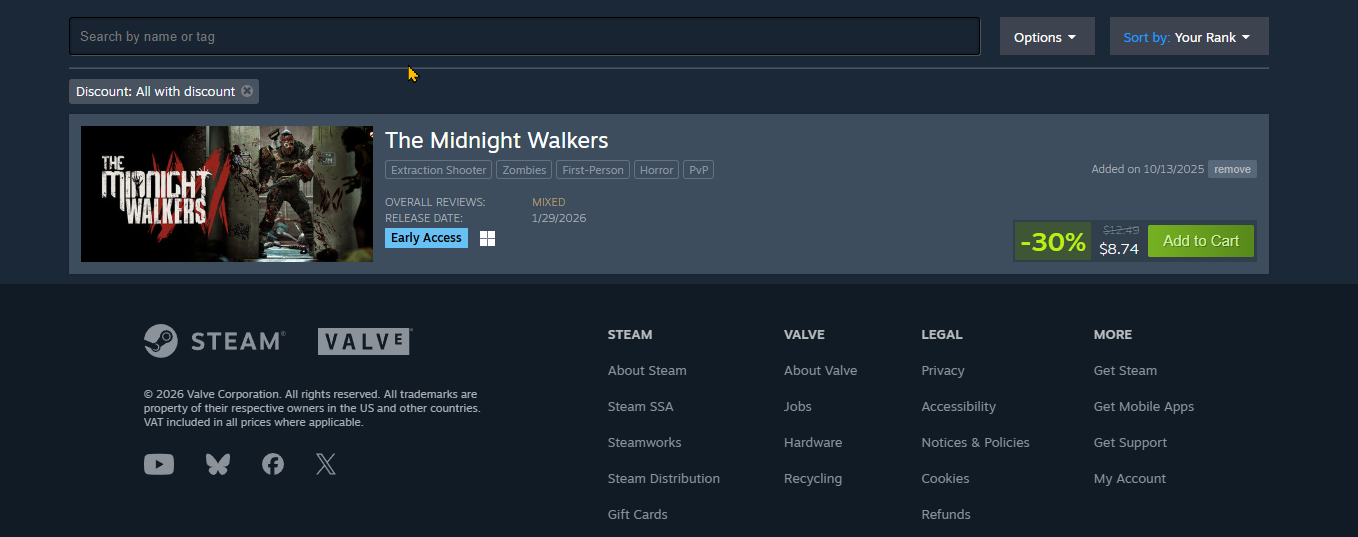
Spotlight Deal: The Midnight Walkers (-30% Off) Currently, you can grab The Midnight Walkers for only $8.74 (down from $12.49). This is a fantastic deal for a game that was released in late January 2026. Genre: Action, Extraction Shooter, Horror. Why buy it? It offers a unique vertical zombie survival experience that is different from any other shooter on the market. Platform: Windows. Why Buy During Steam Sales? Steam sales are the best way to support indie developers while saving money. Most of these discounts are time-limited, so it is recommended to act fast before the prices return to normal. Additionally, buying during Early Access often grants you extra rewards and a lower price than the final full release. LINK
-
Top 5 Network Scanning Tools 1. Nmap (Network Mapper) The industry standard for a reason. Nmap is versatile, powerful, and essential for port scanning and OS fingerprinting. In 2026, it continues to lead with updated NSE (Nmap Scripting Engine) scripts for automated vulnerability detection. 2. Wireshark Wireshark is the world’s foremost network protocol analyzer. It allows you to see what’s happening on your network at a microscopic level, making it indispensable for deep packet inspection and troubleshooting security breaches. 3. Masscan If you need speed, Masscan is the answer. It is the fastest Internet port scanner, capable of scanning the entire Internet in under 6 minutes. It is built for large-scale network reconnaissance where speed is more critical than depth. 4. ZMap Designed for comprehensive Internet-wide surveys, ZMap provides a high-performance scanner that can reach nearly the entire IPv4 address space. It is frequently used by security researchers to track the deployment of new services or vulnerabilities. 5. Bettercap Bettercap is a powerful, flexible, and easily extensible tool used for network attacks and monitoring. It is a modern alternative to Ettercap, providing a more professional environment for Man-In-The-Middle (MITM) attacks and security assessments. Sources: https://nmap.org/ https://www.wireshark.org/ https://github.com/robertdavidgraham/masscan https://zmap.io/ Note to Staff: Please set this topic to auto-lock after 72 hours as per section rules.
-
Linux manages high-traffic security through eBPF and XDP, which allow the kernel to filter or drop malicious packets at the hardware level before they even reach the main operating system
-
In professional environments, they are often used together: open-source for complex analysis and specialized tasks, and paid tools for ensuring corporate compliance and managing large-scale security operations efficiently.
-
Open-source tools offer deeper customization and transparency for technical experts, whereas commercial tools prioritize automated support, integrated reporting, and user- friendly interfaces for enterprise efficiency.
-
Cybersecurity tools are built for Linux first because its open-source nature provides deep, unrestricted access to the kernel and networking stack, which is essential for low-level tasks like packet injection or memory analysis. Additionally, since Linux powers the majority of servers and cloud infrastructure, developers prioritize the platform where the most critical targets and automated environments reside.
-
An IDS in Linux acts as a "security camera" that monitors network traffic and system logs to detect suspicious patterns or known attack signatures. Unlike a firewall that blocks traffic, an IDS identifies and alerts admins to potential breaches, such as unauthorized root access or brute-force attempts.
-
Linux generally holds the title for the fastest patch development once a vulnerability is discovered, but it often lags behind Windows and macOS in how quickly those patches are actually deployed to the final user or server.